[Updated February 2024] Are you a teacher who has to laminate school papers at your own expense or even looking for the best teacher laminators? Do you have a small office and need to laminate some documents from time to time? Then getting a personal laminator is not only a good idea but a necessary one. Having one will save you both time and money.
At some point, it is necessary to laminate a document, either at home or in the office, so it is convenient to have a laminator on hand. And it should meet certain requirements such as having adequate power, be small enough to place it on the desk without problems, but large enough to handle the documents you need laminated, how hot it gets once it is turned on, if it has indicator lights during operation, etc. The best laminators on the market share some common features including great performance, a short warm-up time of 3-4 minutes and Jam Prevention technology to automatically avoid stuck elements.
| Best Home Laminator | View on Amazon | Our Ratings |
|---|---|---|
| AmazonBasics Thermal Home Laminator | Check Price | 4.0/5 |
| 3M Scotch Thermal Home Laminator | Check Price | 4.5/5 |
| Fellowes Saturn3i Thermal Home Laminator | Check Price | 4.3/5 |
| Intey A4 Home Laminator | Check Price | 3.8/5 |
| Blusmart BL01 4-in-1 Home Laminator | Check Price | 4.4/5 |
Table of Contents
What is a Laminator and What Exactly is it Used For?
A laminator is a tool used to protect documents, especially to avoid paper wear by encapsulating the document in an impermeable, clear pouch usually made of a type of plastic. Doing this keeps the document safe from staining, smudges, ripping and other hazards which could damage the document or make it unreadable. As a result, this tool has an indispensable role in preserving the quality of documents. The laminator is particularly useful for protecting very important documents such as contracts of various transactions, communication documents, reports or agendas. They are also used to protect documents that you want to use regularly.
The laminator is made up of a plastic pouch in which you place the paper, heated rollers, hot plates, and a shoe. The better the heating system is, the better the plastic adheres to the paper.
How a Laminator Can Simplify Your Life
Although it is easy to see how a laminator can be useful in a business office, it may not be as easy to see how it can help you at home. For several years now, the laminating machine has been used mainly to protect the photographs and other memories that people wished to preserve long-term. However, many people have thought up other applications for the best laminator for home which can help to simplify your life. Here are some examples from real-life users.
Your Schedule at a Glance
Victoria tells us what she does at the beginning of the school year, “I retrieve school timetables of my kids and I group them on a family schedule on which I find schedules each day of classes, and the schedules of extracurricular activities. Once printed with a color code for each child (I have 3), I laminate my schedule and I display it on my fridge.”
Protect Your Cooking Recipes
John who loves to cook and test new recipes all the time says, “I made a binder in which I compile my favorite recipes. I laminate with perforated pockets, and I can keep them next to me when I cook. With just a sponge, I can clean any splashing of water on my laminated recipes and then I can put them away until next time.”
Keep Your Texts and Drawings Intact
Suzanne, whose grandchildren always offer her drawings regularly says, “I ask them to sign them for me, then I date and laminate them. Too bad that home laminators did not exist when my children were young. I’m sure the new generation would have liked to see what their parents were drawing.”
Preserve Your Clippings
Thomas’s son is part of the city’s basketball club and he said, “I keep all newspaper articles about the games or the team my son plays on. I laminate them all as well as the photos that are taken during the training sessions, the trips and the various competitions he’s in.”
Create Your Teaching Aids
Sam, a teacher, created learning aids on his computer to teach his son how to write and he says, “There are images of animals or objects and lines in front of the writing. Once laminated, my son writes on it with a thin whiteboard marker. The laminated sheets can be erased and reused at will. I can create as many aids as I want with the images of my choice. It helps him learn and he thinks it’s a game.”

Create a Little Game for Your Family
Giovanna has printed in duplicate small photos of her family members and all the family pets, “I laminated them all with a small pocket and created a family memory game for my kids (ages 6 and 9). They love and spend hours playing with it! ”
Simplify the Chore of Shopping
Sarah has come up with an ingenious system, “I have laminated a shopping list that contains all the basics I regularly buy (milk, sugar, coffee, flour, butter) and I glued it on my fridge.
Whenever I am about to run out of one of these lists, I take my erasable marker and check the box of this item. On Saturday, I can see at a glance what I have to add to my list.”
Create Your Custom Calendars
Every year, Joe creates his own calendars. He said, “On birthdays, I put the picture of the person. I add key dates that I already know, I customize the sheets with some photos and quotes of my choice, then I laminate the pages of my personal calendar. I 3-hole punch them and then link my calendars and offer them to my family at the beginning of the year. ”
Laminate Your Holiday Photos
When Audrey returns from vacation, she has a ritual and shared it with us, “I choose my most beautiful photos, I center them on sheets of colors of my choice and laminate them. So no need for framing, I can hang them directly on the wall and the effect is striking!”
Multipurpose Home Laminators
Lamination has taken its place in homes. Now you can create media that were previously only commercially available, personalize them, and offer them to family and friends. Purchasing a laminator is very affordable. Laminating pouches are now available in small amounts, which is better suited for home use. The pouches that have a glossy finish allowing you to use your laminated sheet as a whiteboard: Just write on it with erasable pens, erase what you wrote, then start again.
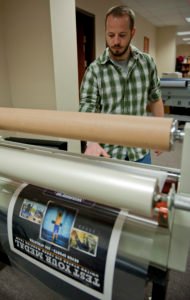 Multi-finished pouches
Laminating pouches that have a matte treatment have a more serious look. They also don’t reflect light. They also come in other finishes: the perforated pockets with 8 holes are ready to be stored in a binder. Color finish pockets will give your laminated white sheets a specific color (green, red, blue, orange, pink, etc.). One-sided matte + one glossy face will give you the opportunity to create original media, with photos on one side (shiny side) and text on the other side (matte side).
A High Degree of Protection
All documents that you laminate will be protected from the wear of time and the elements (preserved from dirt, moisture, scratches, and dust). Laminating also is useful in creative hobbies, scrapbooking, and the creation of visual aids. Make your own signs to stick on your gate or on your doors. You can also create custom placemats. How could you use a laminator to simplify your life and brighten your life?. The only limit is your own imagination.
Reasons to Buy a Home Laminator
To protect your important document from damage. A home laminator manages to protect the material against damage, dirt, stains and accidental cuts, as well as against liquid stains or splashes. It also helps you to give more permanence to your important files.
With the home laminating machine, you can use several types of finishes, such as shiny, soft, anti-graffiti matte laminating.
Best Home Laminators Buying Guide
Kinds of Home Laminators
There are several types of laminators which can be categorized by how to laminate paper and by the types of laminate paper they can use:
Thermal
Thermal laminators use heat to melt the edges of the plastic to be used, but you must be careful with them because they can burn very fine materials. Therefore, you must adjust the temperature, if the device has this ability. These are usually the fastest models.
Cold
There are also cold press laminators which use a plastic material that adheres through pressure, which can be done without actually using the laminator, but these ensure a professional finish, without bubbles and a product good seal. Cold laminators are among the most reliable, durable and accommodate varied sizes of paper.
Combination
These are the most versatile and cheap laminating machines because they use both systems. That way they offer you more options to laminate your files. If you have to laminate many documents, some that are sensitive to heat and some that are not, these are a good option.
Handheld
There are also other laminators that are considered “hand-held”. They are small, simple and fulfill their task quite accurately and quickly, although their size limits their versatility.
Time for Heating and Laminating Speed
These factors are directly related since they both tell you exactly how long it will take to laminate anything with a specific model. The heating time refers to how long the appliance takes to reach the required temperature from startup. The speed of rolling has to do with the time it takes to laminate each piece. Of course, the models which can heat up more quickly and laminate faster will save you time, but they tend to also be the more expensive models. So you need to weigh price against your need for speed.
Lamination Thickness
The degree of protection that a laminate can offer has to do directly with the thickness of the laminate: the thicker the pouch, the greater the protection. However, even the thinner pouches will protect your documents well. Thicker pouches add stiffness to the finished product which you may or may not want. Choosing a model which can use a range of pouch thicknesses will give you the versatility to use different pouches for different needs.
Lamination Rolls
They are easy to use and are the most economical. They can come in standard sizes to laminate business cards, luggage labels, photographs, and other items. Also, they are ideal for home use and occasional projects.
Covers or Pouches
They are recommended for more varied uses and for professionals or people who are going to make many laminations. They are very durable and resistant, so they are widely recommended for schools because they are the best laminator for teachers, businesses or offices where it will be used frequently.
Number of Rollers
The number of rollers directly affects the quality of the laminate. The best laminator machine has two sets of rollers to create the heat or pressure necessary so that the material is sealed properly and you minimize the chance of bubbles or creases in the document and one set to seal the document.
Design
Having a compact and light design is important if you will be moving the laminator frequently which can be the case in a home setting. However, in an office, you can probably use a heavier model because you can set up a permanent spot for the laminator to sit. Lightweight construction is great for portability but can make the model less durable. A heavier model will be more difficult to move around, but will probably last longer and be able to take more frequent use.
Operation
Not only is it important that a laminating machine be able to offer fast and efficient results, but it must also be easy to use and start up quickly. Models that heat laminator machine quickly are usually much more convenient and models that can laminate faster will save you time. These models do tend to cost more and how important the model’s operation speed is will depend on how much laminating you expect to be doing. Typically, the fastest machines are a better option for a busy commercial setting and not as important for home use.
Versatility
The combination laminators which offer both heated and cold lamination, are often favorites for users since they give them many more options. Another factor that contributes to versatility is the type and size of documents that a model can handle. This is why it is very important that you have a very clear idea of the type of work you want to do and the type and size of the files you need to laminate. Check the specifications of each model and make sure it is suitable for what you need.
Other Features You Should Consider
It is also good that you look for other features in a laminator. Of course, they are not necessary, but they can be very useful and can make the laminator more convenient and simple to use. Several of the better models have one or more of these features.
- Automatic Shutdown: Ideal for the equipment to turn off after a certain time to avoid overheating.
- Variable Temperature Settings: Convenient if you want to configure each project to a specific heat or cold level which is necessary to use pouches of varying thickness.
- Anti-jam Function: You can eliminate paper or plastic jams quickly and prevent damage to the equipment.
- Reverse Function: You can remove the material, reverse the process and center the materials whenever you want.
- Easy access: You can quickly and easily access the interior compartments and remove any paper jam or laminating material.
Want to use this infographic on your site?
Laminator Dimensions
It is necessary to take into account the dimensions of the objects that you are going to laminate in order to choose the best laminating machine that meets your needs. Laminators are designed to use most of the standard paper sizes, A2, A3, A4, 8.5×11, #10 business envelopes, etc.
Standard paper sizes
Let’s get a little technical. A laminator can laminate different sizes and different thicknesses of pouches. Here are a few options:
- A4 laminators accept documents ranging from the smallest size (badge) to the maximum A4 (228 x 303mm for pre-punched). This format is generally suitable for both individuals (unless they wish to laminate placemats or posters) as well as professionals.
- A3 laminators accept documents ranging from the smallest size (badge) to the maximum A3 (303 x 426mm). This format is generally suitable for some individuals and professionals unless they wish to laminate posters.
- A2 laminators accept documents ranging from the smallest size (badge) to the maximum A2 (426 x 600mm). This format is generally suitable for professionals who can laminate from the smallest to the largest format.
- The Thickness of the Pockets
- The thickness of the laminating pouches ranges from 60 microns per side (very flexible) up to 250 microns per side (very rigid). The intermediate thicknesses are 80, 100, 125, and 175 microns per side. Measured per side, the real thickness of the cover has to be multiplied by 2 (ie. 2 sides at 125 microns per side = 250 microns total).
- Entry-level laminators only take up to 80 microns per side. They are not expensive, but a little limited.
- Mid-range laminators accept up to 125 microns per side. They represent the majority of laminator sales.
- Professional laminators accept all thicknesses up to 250 microns per side, they are the most versatile. Due to their cost, they are strongly recommended only for professional use.
Things to Remember
- To obtain optimal results in your work, it is necessary that you do not skimp on the quality of the plastic sheets you use to laminate. Cheap laminate makes for bad results.
- Use the right laminate thickness for the job. If you are looking laminate a menu, for example, use a pouch of at least 125 microns in order to protect the paper and give it enough rigidity to stand up to daily use. Documents which won’t receive that much use will not need as much thickness.
- Hot laminators need to be cleaned after use with a cleaning sheet that absorbs glue residues left behind in the machine and these cleaning sheets are not included with the laminator.
- Laminate bags have their thickness measured in microns. The thicker the laminate, the less chance that heat damage will happen to your document.
Best Home Laminator Models 2024
comp_HomeLaminatorsWant to use this infographic on your site?
AmazonBasics Thermal Home Laminator

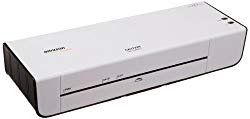 Amazon not only sells virtually every manufacturer’s products, but they also produce their own products! For example, recently I had the opportunity to test one of their products: the Amazonbasics Thermal A4 Laminator. Let’s review this product’s features and benefits.
This small laminator has a combination of benefits. Its extremely fast heating time, for example, will allow you to save a lot of time and solve emergency situations when you need to laminate a document at the last minute. A 4-minute warm-up time and it’s ready to use. It also has an indicator light telling you that the laminator is hot.
This Amazon laminator is compact and lightweight. It weighs just over 2 pounds and its small dimensions will allow you to slip it into your backpack or in your computer bag without any problems. Once at your workplace or anywhere else you will need to laminate documents, it will take up a very small space on the table or desk. It can even be used on a corner of the table if necessary.
Features of AmazonBasics Thermal Laminator
- It works with basic laminating pouches.
- It features a selection button between 3 and 5-millimeter lamination.
- A light signal tells you when it is ready for use.
- It is equipped with a two-roll guiding system.
- Its 4-minute heating time is very fast.
- It is equipped with a convenient anti-lock lever.
- This laminator measures 34 centimeters long, 12.3 centimeters wide, and 6.2 centimeters high.
- It can laminate documents up to 23cm wide.
- It weighs only 2.5lbs.
Check out the video of AmazonBasics Thermal Laminator unboxing and review
Pros And Cons of AmazonBasics Thermal Home Laminator
- Fast heating time
- Very lightweight
- Takes up little space
- Very durable
- It is not the lightest home laminator in the market
3M Scotch Thermal Home Laminator
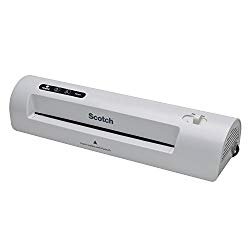

Although designed for home use, the Scotch brand laminator’s quality is professional-grade. It features dual temperature settings for different pouch thicknesses and it is designed to be very portable and has a quick startup time. The Scotch thermal laminator is compatible with standard 8.5 x 11 sheets of paper but has extra width built in for easier handling. There is also dual roller which adjusts the speed in order to correct misfed documents.
Features of 3M Scotch Thermal Laminator
- 3-4 minutes fast warm-up.
- Laminates 1 standard 8.5×11 page per minute.
- Designed to be convenient, quick and easy to use.
- Features a ready warm-up light signal indicator.
- Can use a variety of pouch sizes.
- Features a dual temperature setup for 3 and 5-millimeter laminating pouches.
Want to see tutorial DEMO of Scotch laminator. Check out the below video
Pros And Cons of 3M Scotch Thermal Home Laminator
- It is very portable
- Fast warm-up time
- It is very budget friendly
- It is very easy to use.
- A little more expensive than other models
Fellowes Saturn3i Thermal Home Laminator
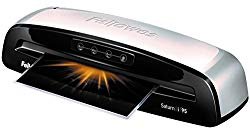

This laminator has a clean and simple design. The few buttons that are needed are large and illuminated. Beep signals give you a warning when the correct temperature for laminating is reached. The numbers 80, 100 and 125 refer to the thickness of the laminating sleeves. The thickness is measured in microns and the thickness mainly determines the temperature the machine must reach to laminate successfully. The maximum thickness of the laminating sleeves is also 125 microns. The last button on the Saturn 3i is for cold lamination where the pouch is sealed solely on the basis of the pressure exerted by the rollers. This is especially important for documents that are thermally printed.
With lamination, speed is less important than the end result. The thermal laminating pouches need time to melt and harden. The process just runs smoothly with the Saturn 3i. The Saturn 3i heats up very quickly and is ready in 30 to 60 seconds. To prevent unnecessary power consumption, it will go into standby mode after a short time without any use.
Features of Fellowes Saturn3i Thermal Laminator
- Ready in just 1 minute
- For removal of waste paper and auto shut off, it possesses a release lever that disengages the pouch
- Features a jam-free technology
- Up to 5mm laminating
Pros And Cons of Fellowes Saturn3i Thermal Home Laminator
- It is fast to heat up
- It accommodates several paper sizes
- Jam-free technology
- A bit more expensive than other models
Intey A4 Home Laminator

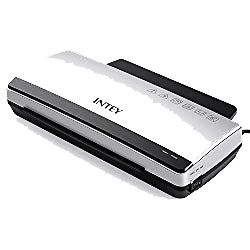 Intey generally offers cheap equipment, offering only satisfactory performance. The A4 Intey Laminator seems to be in this category. Able to laminate hot and cold, it should operate within normal tolerances. It is one of the many choices on Amazon and users leave mostly positive comments.
It is difficult to find any defects in this laminator. The quality of lamination is comparable to high-end professional models, and even if the work takes a little longer, it remains right in the average in terms of speed. In short, a nice office and home tool at a low price.
Whether cold or hot, the lamination is good. The air is removed from the document and the film around it, and I have not had a single bubble or crease during my many tests. I even put the document in at an angle once to test the limits, and it gradually went right back and the lamination had no flaws. If a problem occurs and the document is filling with the plastic film, then the button on the back of the laminator allows you to open the rollers to clear the whole thing so you can get out the document very easily.
Features of Fellowes Saturn3i Thermal Laminator
- It heats up in 3-5 minutes
- Its rolling speed is 9.8 pages per minute
- Thermal Switch: Automatically controlled between 110 degrees and 130 degrees
- Jam prevention technology
Pros And Cons of Intey A4 Home Laminator
- As fast on temperature as more expensive models
- Clear operation
- Laminates very neatly
- For 80-125 micron covers
- Available cold laminating option
- Storage convenience could be better
Blusmart BL01 4-in-1 Home Laminator

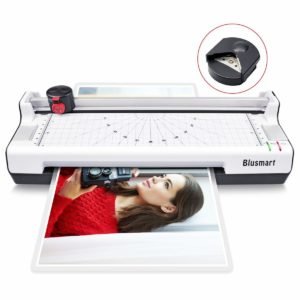 This laminator can be used at the office or at home. If you need to cut some documents cleanly and laminate them, then the Blusmart 3 in 1 laminator is the best choice for you because it really does it all. It comes equipped with a paper cutter and the ability to round the corners of the laminated pages.
This laminator does its work well whether hot or cold, its rollers are designed to expel air while the plastic is being heated to enclose the document neatly. It doesn’t leave any small bubbles or a fold even if the document is positioned at a slight angle, its rollers just provide guidance to the documents so that it won’t be a problem to the user.
It is called a 4-in-1 laminator because it features a corner cutter and trimmer. Though its corner cutter is not a professional model, it gets the job done well and can cut up to 3 sheets simultaneously. It also comes with a marker to cut important documents as straight as possible. It can also cut rounded corners very well and trim it to give a nice looking and smooth document. This feature is appreciated because it ensures that cutting documents will be less hazardous.
Features of Blusmart BL01 4-in-1 Laminator
- Low noise producing mechanism with auto laminating options
- Warms-up faster than 3 minutes
- Superb 3-in-1 function; laminator, rotary paper trimmer, corner rounder.
- Features 3 distinct cut patterns adjusting between perforated, wavy, straight.
- Features dual- thermal and dual lamination option
Pros And Cons of Blusmart BL01 4-in-1 Laminator
- It is very budget friendly
- Fast warm-up time
- Easy to use
- According to other home laminator reviews online, you will need to learn how to use the marker for cutting documents.
Tips for Using Your Home Laminator
Once you have chosen the right laminator for your needs you must learn to use it properly in order to make the best use of it.
- Always read the user manual completely before trying to use the laminator. Each model may work a little differently and understand how your model functions and what things you must keep in mind while using it is very important to get the best results from your new machine.
- Give yourself enough time to use the laminator properly. A laminating machine is first and foremost an electric heating appliance. Because of the heating element, there will be a warm up and cool down phase of usage which will add some time to your process. You should turn on the device and wait a few minutes to warm up and give it several minutes to cool down after you are finished. When the light goes from red to green, it means that the laminator is ready to be used.
- Normally, you will have to push the paper so that it is positioned between the plastic rolls and the laminator can hold the paper properly. Once this is done, the power button will be pressed and the laminator will begin to work. If paper begins to enter into the machine, everything is working.
- Under no circumstances should the machine be interrupted while laminating. You must wait for the entire document to go through or the entire process will stop and the result will most likely be a jammed machine and ruined document. Once the plastic is ready you can use scissors to cut the plastic sheet or the guillotine that usually comes with the laminator.
- When you are finished, the laminator should be turned off immediately so that it does not overheat.
Laminating on one side
In the field of plastic lamination, there are no machines for laminating on one side. It exists in the continuous plasticization but there is another technique called filming. Here is how to laminate on a single side:
-
- Take one of two plastic sheets that are to be the cover.
- Place the cover on the face of the document that you want to laminate.
- Slide the assembly in a cardboard carrier (a special cardboard sleeve for laminating).
- Run the carrier through the laminator as usual.
- Cut the plastic flange flush with the paper.
Other General Information for Home Laminators
The Legal Warranty
Remember that the legal warranty against hidden defects does not cover the use of the laminator. You must read the instructions for use of your machine. Remember that it is up to the consumer to prove the existence of a hidden defect.
Voiding the warranty
In general, it is strongly discouraged to open the laminators in case of failure. It is best to leave this operation, which can sometimes be complicated, to the technical services of the different manufacturers. If you try fixing the machine yourself, you could do more damage to it and void the warranty. Also, it can hamper the tech support determine what the original problem was if you have caused further damage in an attempt to fix it.
Overheating Caution
A laminating machine is first and foremost an electric heating device, and that beyond these durations, it is necessary to give them a cooling time which may be indicated in the instructions of use, but not always. Otherwise, you should wait until the laminator is cold again. A professional laminator is designed to stop itself after a period of non-use. However, some consumer models do not have an auto shut-off feature and must be turned off manually to avoid overheating. Lamination times before overheating:
- A personal laminator can laminate between 15 and 30 minutes depending on the model.
- An office laminator can laminate between 30 and 90 minutes depending on the model.
- A professional laminator can laminate between 2 and 6 hours depending on the model.
Clean the Rollers
While you laminate your documents, tiny drops of glue escape pockets and are deposited on the rollers of the machine. As the rolls are hot, it ends up being a kind of sticky film. And of course, if nothing is done, this film will accumulate use after use and will eventually gum up the machine. From that moment on, a laminating pouch can wrap around the rollers at any time and cause a jam. To avoid this issue, use a cleaning sheet after every hot lamination session. A cleaning sheet is a cardboard sheet which is passed 2 or 3 times through the machine and removes the small dots of glue from the rollers.
Check your paper thickness
Do not put documents in your laminator which are thicker than is recommended by the manufacturer. You need to rely on the manufacturers’ recommendations which are usually written in the instructions for your laminator. Unless otherwise stated in your instruction manual, a general rule is:
- Personal laminators accept a thickness of 0.5 millimeters (up to 125 microns per side)
- Office laminators accept a thickness of 1 millimeter (from 175 to 250 microns per side)
- Professional laminators accept a thickness of 3 to 6 millimeters (up to 250 microns per side)
If you try to insert documents that are thicker than the recommended standard, you may damage the roller pressure mechanism. This could make the laminator totally unusable. The documents to be laminated must be flat and without reliefs (which excludes fabric, pieces of wood and metal parts, for example).
One Piece at a Time
Pass one pouch at a time through your laminator. Trying to laminate multiple items at the same time is a recurring cause of jamming issues. Badges are a good example of multiple item jamming issues. As long as the badge is only one layer, you can use a special cardboard carrier to laminate several badges at once. Not using this carrier cardboard (you put the documents in the pockets and then the pockets in the laminator-just like the pocket projector) considerably increases the risk of one or more pockets eventually wrapping around the rollers and jamming the machine.
Respect the Right Formats
Respect the right paper sizes for each type of laminate pouch: It is best to avoid, for example, putting several business cards in an A4 pouch or several A5 sized flyers in an A3 pouch.
Use the right size laminate pouch for the item you want to laminate. Example: an A4 paper document (210 x 297 mm) in an A4 pouch (216 x 303 mm).
If you laminate business cards in an A4 pouch you will be forced to cut the laminated pouches. In doing so, the seal is broken and it will be necessary to pass the business cards one by one through the laminator to seal the edges again. Also, the corners will no longer be rounded and the square corners are quite sharp (you can, however, use rounder angles). In short, you won’t save time or money taking shortcuts with the process.
Proper Item Insertion is important
It is important to put your items straight into the machine. If you insert your laminate pouch containing the paper in the laminator, you may create a paper jam if the pouch wraps around the rollers. If with a little luck, it does not cause jamming, it will very likely damage your laminated document, for example, causing an untimely crease. So, If this happens, the laminated document should be ironed in the machine immediately to try to correct the defect by heating it again. So it is recommended to insert the document and pouch directly in the center of the insertion slot taking into account, if necessary, printed format guides on the laminating machine.
Stay Within the Limits
Do not use your laminator beyond its capabilities. Using your laminator much more intensively than what it was made for will result in jamming issues, overheating risks and damage to your items and the laminator, none of which are covered by the warranty.
The operating conditions of a laminator are specified in the product sheet on the manufacturer’s sites: maximum daily use time, recommended weekly lamination number, heating time, the maximum thickness of lamination, etc. They can also be found in the instructions manual.
Where to Laminate Safely
Do not use your laminator just anywhere: It may seem obvious to some to be cautious in the use of an electrical appliance, but, as experience sometimes points out, it can not be overemphasized that some ways of doing things can be dangerous.
Therefore, care should be taken to laminate only on a stable work surface away from any water sources. It is also strongly discouraged to eat or drink while laminating documents.
Conclusion
We hope this article answered some of your questions about home laminating machines reviews, how they work and what to look for when buying one. Join the discussion! What did we miss? What other models do you think rate as the best? And what should other factors be considered when purchasing a home laminator? Leave us a comment below and share this article with your friends.




A few days back, I purchased Scotch Thermal Laminator 2 Roller System, it works but it started making a rattling noise after using for a few times but it still continues to work so I can’t say that it is bad. It has laminated over 400 sheets in about a month. 🙂
Really very happy to say, your post is very interesting to read. You’re doing a great job. Keep it up.
Will 3M Scotch Thermal Home Laminator laminates 5ml pouches?
The Blusmart BL01 4-in-1 Home Laminator is the best home laminator and I would definitely recommend it. The first thing that I noticed was how fast it warms up. The green light came on much faster than other laminators that I have used. I was attracted to this laminator when I saw the trimming tool on top. I have a similar cutting board that I use with my laminator at home. This is so much easier since it is always right there. Thumbs up from me.
I totally agree with you that it does warm up quickly. Thanks for sharing your experience with us.
Well written and informative article. I want to purchase the best home laminator for my kids. Can you suggest to me?
The Fellowes Saturn3i Thermal Home Laminator was okay. It works well but I feel like it takes a lot of effort to put in the sheets right in the middle of the machine for it not to jam. Once it is slightly off it jams or ruins the sides of your sheet.
Looking for the home laminator. I had a cheap one a few years back, but then moved country and left it behind. I teach elementary math, so am constantly laminating things for the walls as well as games and activities kids can use in their rotations. Any recommendations?