Renting a home or apartment should not prevent you from enjoying convenient keyless entry. The problem is that many traditional smart locks require you to replace the entire deadbolt, modify the exterior hardware, or drill holes for a keypad. Those changes may violate a lease or upset a property manager.
The best smart locks for renters without drilling take a different approach. Known as retrofit smart locks, they generally attach to the inside of the door and operate the existing deadbolt. Your exterior lock and original key remain available, while the interior mechanism gains app control, automatic locking, temporary access, and other smart features.
Although these locks are easier to reverse than full replacements, “no drilling” does not always mean “no installation.” Some models replace the interior thumb turn using the deadbolt’s existing screws, while others mount over it with a clamp or removable adhesive. Always check your lease and obtain your landlord’s permission before altering any lock.
Table of Contents
Quick Comparison of the Best Renter-Friendly Smart Locks
| Smart lock | Best for | Exterior key retained? | Remote access | Optional keypad |
|---|---|---|---|---|
| August Wi-Fi Smart Lock | Best overall | Yes | Built-in Wi-Fi | Yes |
| SwitchBot Lock Pro | Easiest reversible installation | Yes | Hub required | Yes |
| Yale Approach Lock | Complete keypad package | Yes | Wi-Fi bridge included in select bundles | Yes |
| Aqara Smart Lock U200 | Apple Home and Matter users | Yes | Depends on ecosystem and hub | Included |
| Wyze Lock | Budget-conscious renters | Yes | Gateway required | Optional |
1. August Wi-Fi Smart Lock — Best Overall
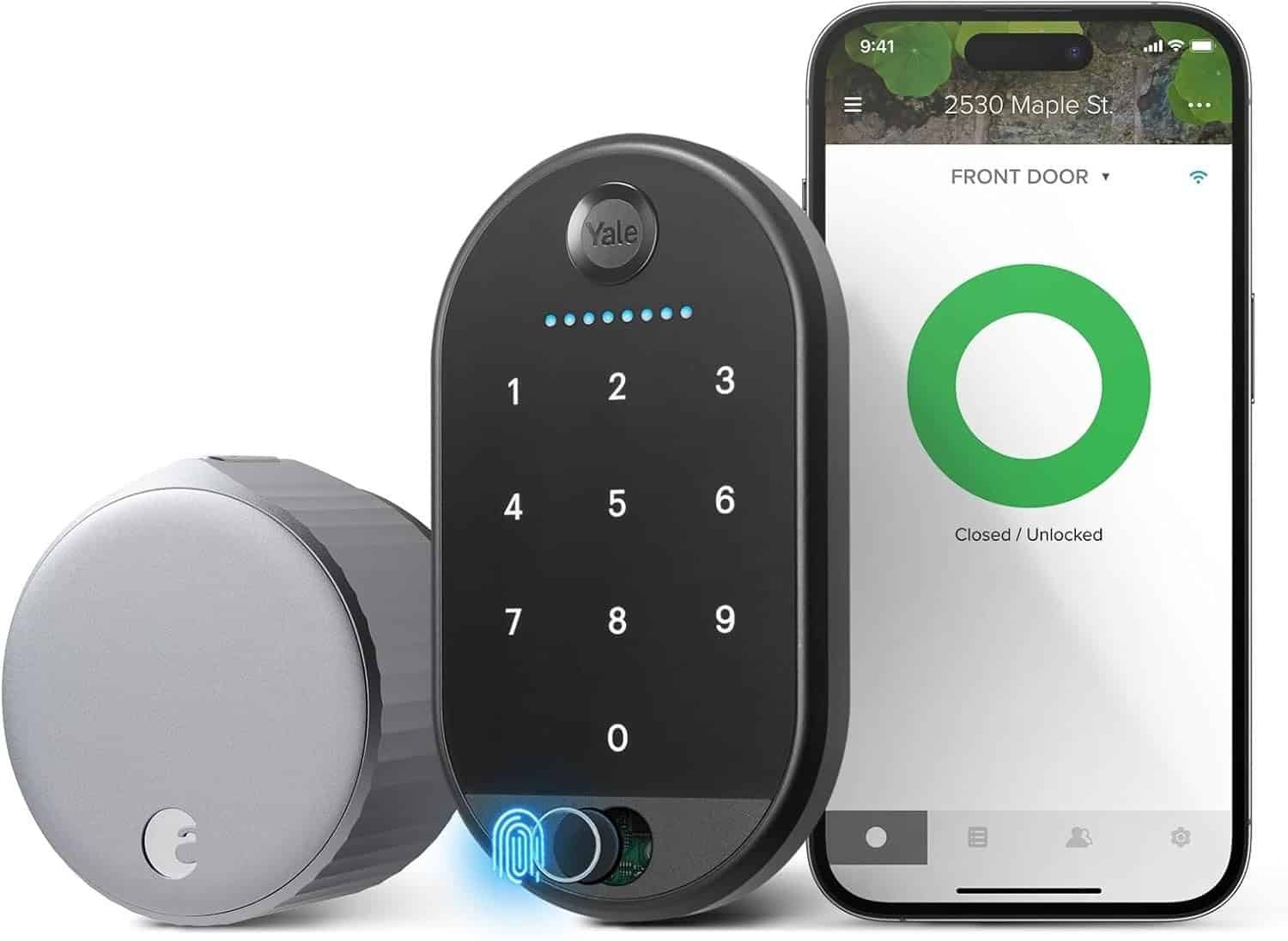
The August Wi-Fi Smart Lock is one of the most recognizable retrofit locks available. It replaces only the thumb-turn section on the inside of a compatible single-cylinder deadbolt. The exterior hardware remains unchanged, allowing residents, landlords, or maintenance personnel to continue using the original physical key.
Unlike some competing products, this August model has Wi-Fi built in. You do not need to place a separate bridge near the front door for remote app access. From the August app, you can check the lock’s status, lock or unlock the door remotely, review activity, and send digital access to trusted visitors.
Auto-Unlock can detect when an authorized user approaches the home, while Auto-Lock helps secure the door after departure. Voice-assistant compatibility also makes the lock a convenient choice for renters building a broader smart-home system.
August’s official installation instructions show that the exterior portion of the existing lock remains in place while the interior thumb turn is removed and replaced. Because compatibility depends on the deadbolt, renters should check the manufacturer’s compatibility guide before ordering.
 Pros
Pros
- Preserves the existing exterior lock and physical key
- Built-in Wi-Fi eliminates the need for a separate bridge
- Remote locking, activity history, and virtual guest access
- Auto-Lock and Auto-Unlock features
- Optional keypad available
Cons
- More expensive than basic Bluetooth-only locks
- Replaces the interior thumb turn
- Compatible mainly with standard single-cylinder deadbolts
- Battery life can vary with Wi-Fi use
Best for: Renters who want a polished, all-in-one retrofit lock with remote access.
Check the August Wi-Fi Smart Lock on Amazon
2. SwitchBot Lock Pro — Best for Easy Removal
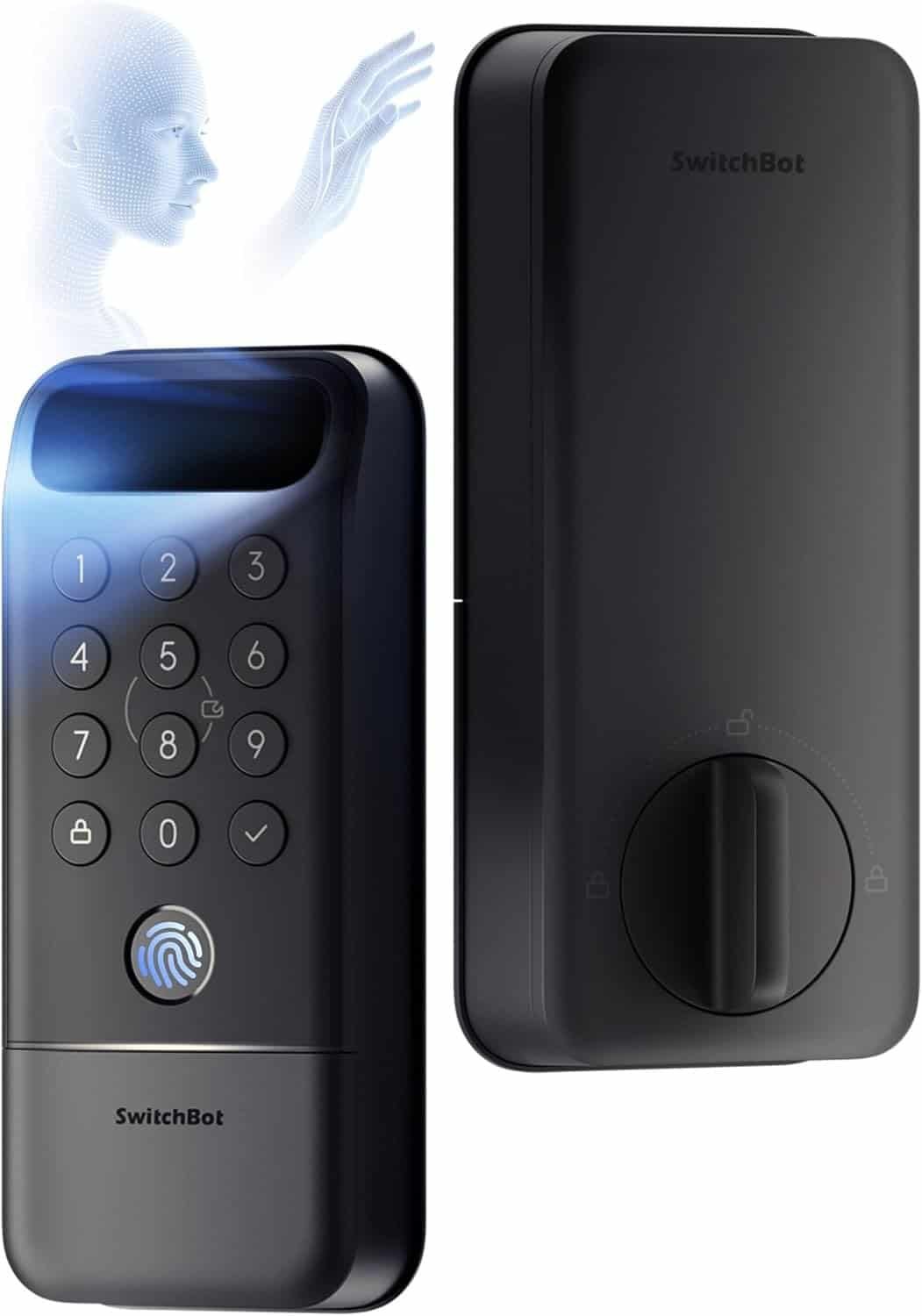
The SwitchBot Lock Pro is particularly appealing to renters because it is designed to work with the lock already installed on the door. Instead of replacing the exterior cylinder, it mounts on the interior and mechanically turns the existing thumb turn.
This arrangement allows renters to retain their original keys and exterior hardware. It may also make moving easier because the device can be removed and potentially installed at the next residence, provided the new lock is compatible.
The Lock Pro supports app control through Bluetooth. Features such as remote operation, voice commands, and selected third-party integrations require a compatible SwitchBot Hub. Adding the SwitchBot Keypad Touch introduces passcode, fingerprint, and NFC access without replacing the exterior deadbolt.
SwitchBot states that the Lock Pro supports most North American residential locks, although unusual mortise, multi-point, and jimmy-proof locks may require extra attention or adapters. The company advertises up to nine months of battery life from four AA batteries, but actual performance depends on usage and environmental conditions.
 Pros
Pros
- Fits over many existing interior lock controls
- Original exterior lock and key remain usable
- Uses readily available AA batteries
- Optional fingerprint and passcode keypad
- Door-status detection and automatic locking
- Easy to remove when moving
Cons
- Remote control requires a compatible hub
- Full functionality can require several accessories
- Bulky compared with some retrofit models
- Compatibility should be checked carefully
Best for: Renters who prioritize reversibility and do not want to replace the interior deadbolt assembly.
Check the SwitchBot Lock Pro on Amazon
3. Yale Approach Lock — Best Keypad Package
The Yale Approach Lock brings Yale’s established lock platform to the renter-friendly retrofit category. It is installed on the interior side of a compatible deadbolt while leaving the exterior keyway intact.
This makes it suitable for renters who need to preserve conventional key access for a landlord or property manager. Select packages include a wireless keypad and Wi-Fi bridge, providing several ways to enter and manage the home.
The Yale Access app supports remote locking and unlocking when the lock is connected through Wi-Fi. Users can create entry codes for roommates, relatives, cleaners, pet sitters, or other trusted visitors. Temporary codes are easier to revoke than copied physical keys and can be useful in a shared apartment.
The separate keypad can generally be installed with removable adhesive instead of drilling. Renters should confirm the mounting method included with the selected package and make sure the adhesive will not damage painted, finished, or delicate surfaces.
Yale describes the Approach as its retrofit smart-lock solution, designed to upgrade an existing deadbolt while preserving its exterior appearance.
 Pros
Pros
- Maintains the original key and exterior hardware
- Available with a wireless keypad
- Supports temporary and recurring access codes
- Familiar Yale app ecosystem
- Suitable for families, roommates, and recurring visitors
- Clean interior design
Cons
- Remote access may depend on the included package or bridge
- Costs more when purchased with the keypad and Wi-Fi accessories
- Interior thumb turn must be removed
- Not compatible with every deadbolt
Best for: Renters who want a complete lock, keypad, and remote-access package from one brand.
Check the Yale Approach Lock on Amazon
4. Aqara Smart Lock U200 — Best for Apple Home and Matter
The Aqara Smart Lock U200 is a feature-rich retrofit option for renters who use Apple Home or want Matter compatibility. It operates the existing lock from the interior while allowing the exterior key cylinder to remain available.
A major advantage is its included exterior keypad. Depending on the configured platform and supported device, users may unlock the door using a fingerprint, passcode, NFC method, smartphone, or Apple home key. This flexibility is valuable in households where not everyone wants to use the same app.
Matter-over-Thread support can connect the lock to compatible smart-home platforms. However, advanced remote control and automation may require an appropriate Matter controller and Thread border router. Apple, Google, Alexa, or SmartThings users should verify their existing hub configuration before purchasing.
The U200 supports various lock types across different regions, but that broad compatibility also makes pre-purchase research important. Renters should compare their cylinder, thumb turn, door clearance, and rotation requirements with Aqara’s installation documentation.
Aqara highlights the U200’s Matter support, Apple home key capability, fingerprint access, rechargeable lock battery, and keypad-based entry.
 Pros
Pros
- Retrofit design preserves the existing key cylinder
- Keypad included
- Fingerprint and passcode entry
- Apple home key support
- Matter-over-Thread compatibility
- Multiple entry methods for shared households
Cons
- More complicated ecosystem requirements
- Remote features may require additional hardware
- Compatibility varies by lock and region
- Keypad installation may still involve adhesive or optional screws
- Premium price compared with simpler retrofit locks
Best for: Apple Home users and renters who want advanced access methods and Matter integration.
Check the Aqara Smart Lock U200 on Amazon
5. Wyze Lock — Best Budget-Friendly Option
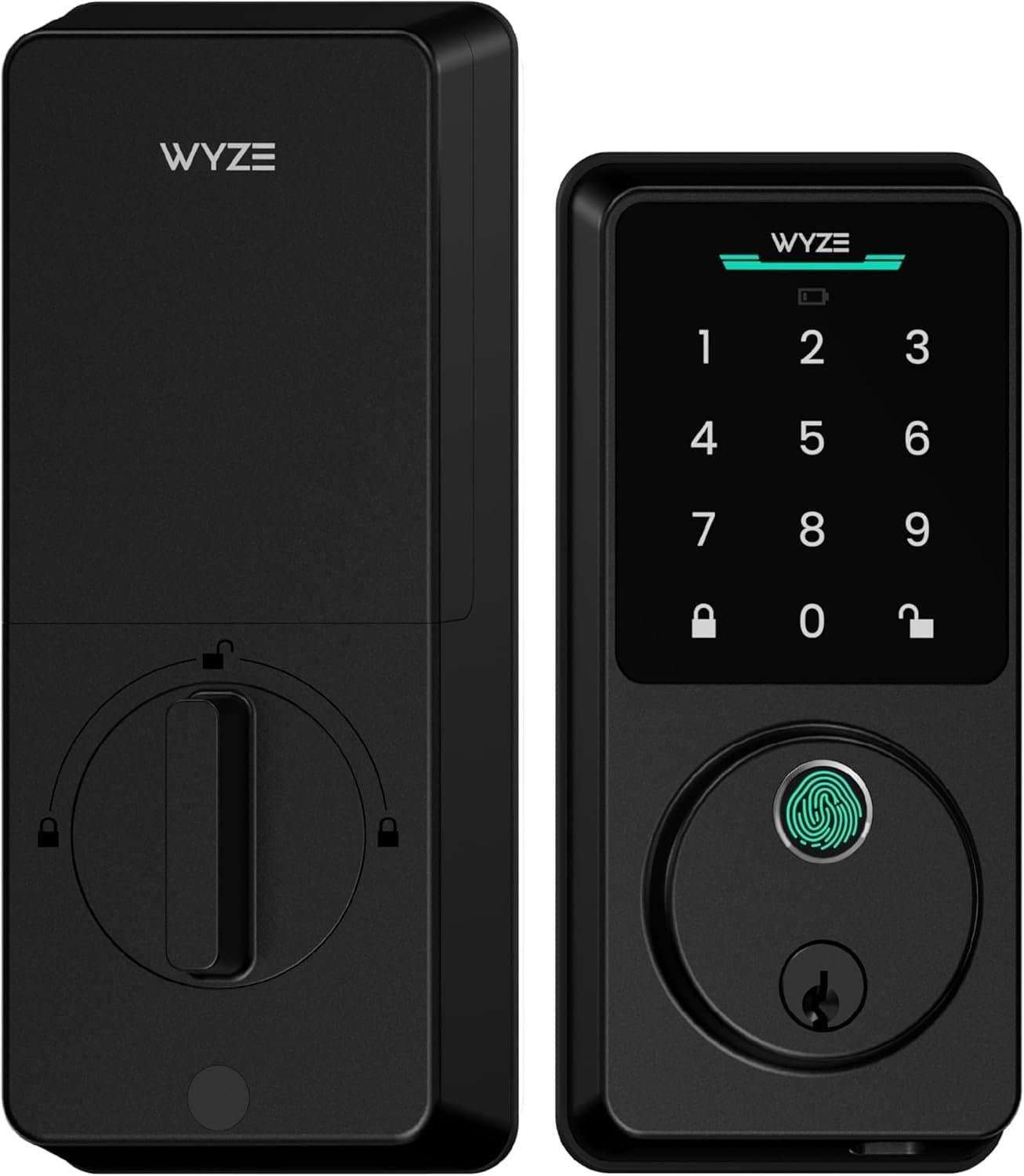
The Wyze Lock offers core retrofit features at a generally accessible price. It replaces the interior thumb turn of most compatible single-cylinder deadbolts while leaving the exterior portion unchanged. That means renters can continue using the same physical key.
The lock includes Bluetooth connectivity for nearby control, while its gateway enables remote locking and unlocking through the Wyze app. It also offers Auto-Lock, Auto-Unlock, access history, virtual key sharing, and door-position detection.
Built-in door-position sensing is a helpful feature because it can distinguish between a door that is closed and locked and one that is simply reported as locked while standing open. Users can also receive notifications if the door has been left open.
An optional Wyze keypad adds code-based entry. The company says the keypad is weather resistant and can communicate wirelessly with the lock. According to Wyze, the main lock uses four AA batteries with an estimated five-to-six-month life, although real-world results vary.
 Pros
Pros
- Retains the original exterior lock and key
- Gateway supports remote access
- Door-position detection is built in
- Auto-Lock and Auto-Unlock
- Shareable virtual access
- Optional wireless keypad
Cons
- Remote features require the gateway
- Keypad is normally sold separately
- Shorter estimated battery life than some competitors
- Primarily suited to standard single-cylinder deadbolts
- Smart-home integrations are less extensive than Matter-based options
Best for: Renters seeking essential smart-lock features without paying for a premium ecosystem.
How to Choose a Smart Lock for a Rental
Look for a Retrofit Design
A renter-friendly smart lock should preserve the exterior cylinder and operate the lock from inside. This helps maintain the appearance of the door and allows the existing physical key to continue working.
Confirm Deadbolt Compatibility
Most retrofit locks work best with a single-cylinder deadbolt: a keyhole outside and a thumb turn inside. Mortise locks, interconnected locks, jimmy-proof locks, multi-point systems, and locks built into door handles may not be compatible.
Photograph both sides of your lock and compare them with the manufacturer’s compatibility guide before purchasing.
Understand What “No Drilling” Means
Some retrofit locks mount over the existing thumb turn without altering the deadbolt. Others require you to remove the interior thumb turn and attach a mounting plate using the screws already present in the lock.
Neither approach normally requires new holes, but the second still temporarily changes the lock hardware. Keep every original component in a labeled bag so you can restore the door when moving.
Check Keypad Installation
A wireless keypad may attach with adhesive, screws, or either method. Adhesive is usually more renter-friendly, but it can still lift paint or leave residue. Test removable mounting materials carefully and follow the manufacturer’s instructions.
Decide Whether You Need Remote Access
Bluetooth control works when you are near the door. Locking or unlocking from another location generally requires built-in Wi-Fi or a separate bridge or hub.
Remote access is useful when letting in family members, service providers, or trusted visitors, but it may increase cost and battery consumption.
Consider Your Smart-Home Platform
Check whether the lock works with Apple Home, Amazon Alexa, Google Home, SmartThings, or Matter. Do not assume every advertised feature works across every platform. Matter products may also require a compatible controller or Thread border router.
Plan for Battery Failure
Choose a lock that sends low-battery warnings and preserves physical-key access. The ability to use the original key is especially important for renters because it provides a straightforward backup if the batteries, app, Wi-Fi, or hub fail.
Smart-Lock Tips for Renters
Before installing any smart lock:
- Read the lock-related clauses in your lease.
- Ask the landlord or property manager for written permission.
- Confirm that management can still enter with the authorized key.
- Photograph the original installation.
- Store all removed screws, adapters, and thumb-turn components.
- Avoid permanent adhesives on delicate finishes.
- Test manual key operation after installation.
- Restore the original hardware before moving out.
A smart lock should not interfere with building access rules, emergency entry, fire-safety requirements, or the landlord’s legal right of access.
Frequently Asked Questions
Can renters legally install smart locks?
The answer depends on the lease and local laws. Even a reversible smart lock may count as an alteration. Obtain written landlord approval before installation.
Do retrofit smart locks require drilling?
The models in this guide are designed to work without drilling new holes into a compatible door. Some replace the interior thumb turn using existing deadbolt screws, while others fit over the current mechanism.
Can the landlord still use the original key?
Usually, yes. Retrofit locks preserve the exterior key cylinder, but you must install the device correctly and verify that the physical key still operates smoothly.
Will a smart lock work when Wi-Fi goes down?
Most models retain local Bluetooth, keypad, fingerprint, or physical-key access. Remote app control generally becomes unavailable until the internet connection returns.
Can I take the smart lock when I move?
In most cases, yes. Remove it carefully, reinstall the original interior hardware, and keep all adapters and mounting pieces for your next residence.
Final Verdict
The August Wi-Fi Smart Lock is the best overall option for renters who want built-in Wi-Fi and a streamlined app experience. The SwitchBot Lock Pro is particularly attractive when easy removal and preservation of the existing lock are the priorities.
Choose the Yale Approach for a convenient keypad bundle, the Aqara U200 for Apple Home and Matter features, or the Wyze Lock for an affordable entry into retrofit smart security.
Whichever model you select, verify compatibility and obtain landlord permission first. The best smart locks for renters without drilling provide convenient access while keeping the door, original key, and security obligations intact.
Product specifications and availability can change. Review the current manufacturer information and Amazon listing before purchasing.