Smart locks can make your front door more convenient, easier to manage, and more accessible to family members and trusted visitors. Unfortunately, some connected home-security products require an ongoing subscription to unlock cloud storage, detailed activity reports, advanced notifications, or other useful features.
The good news is that you do not need to add another monthly bill to enjoy keyless entry. Many of the best smart locks without monthly subscription fees provide essential features such as app control, access codes, fingerprint recognition, automatic locking, temporary guest access, and smart-home integration without requiring a paid plan.
A no-subscription smart lock can be especially useful for busy households, rental properties, home offices, caregivers, and anyone who regularly needs to provide controlled access to a front door. Depending on the model, you may be able to unlock the door with a fingerprint, PIN, smartphone, smartwatch, voice assistant, NFC card, or traditional backup key.
In this guide, we compare five strong options for different households, budgets, and smart-home ecosystems.
Affiliate disclosure: This article contains Amazon affiliate links. We may earn a commission from qualifying purchases at no additional cost to you.
Table of Contents
Quick Comparison Table
| Smart Lock | Best For | Main Entry Methods | Remote Access | Subscription Required? |
|---|---|---|---|---|
| Schlage Encode Plus | Best overall | Keypad, app, Apple Home Key, key | Built-in Wi-Fi | No |
| eufy Smart Lock C220 | Fingerprint access | Fingerprint, keypad, app, key | Built-in Wi-Fi | No |
| Aqara Smart Lock U100 | Apple smart homes | Fingerprint, keypad, Home Key, NFC, key | Hub required | No |
| ULTRALOQ U-Bolt Pro Wi-Fi | Flexible access options | Fingerprint, keypad, app, key | Wi-Fi, depending on version | No |
| Wyze Lock Bolt | Budget buyers | Fingerprint, keypad, app | Bluetooth on original model | No |
Top 5 Best Smart Locks Without Monthly Subscription
1. Schlage Encode Plus Smart Wi-Fi Deadbolt
Best Overall Smart Lock Without a Subscription
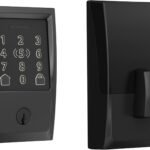
The Schlage Encode Plus is an excellent choice for homeowners who want dependable security, built-in Wi-Fi, convenient code management, and strong smart-home compatibility without paying a monthly fee.
Because Wi-Fi is built into the lock, you do not need to install a separate bridge for standard remote access through the Schlage Home app. When connected to your home network, the lock can be controlled and monitored remotely, and access codes can be managed from a compatible smartphone.
One of its standout features is support for Apple Home Key. Compatible Apple users can add a digital house key to Apple Wallet and unlock the door by holding an iPhone or Apple Watch near the lock. Schlage also supports Apple Home and traditional keypad entry, making the lock useful even when household members do not want to use the app.
The Encode Plus is particularly appealing for families because each person can use a separate access code. Temporary codes can also be created for houseguests, cleaners, pet sitters, or contractors, reducing the need to distribute physical keys.
 Key Features
- Built-in Wi-Fi connectivity
- Apple Home Key support
- Touchscreen keypad
- Remote locking and unlocking
- Custom access-code management
- Voice-assistant compatibility
- Automatic locking
- Traditional key backup
- No mandatory monthly subscription
Pros
- No separate Wi-Fi bridge required
- Excellent option for Apple households
- Strong combination of security and convenience
- Easy to create individual access codes
- Established lock manufacturer
- Multiple trim and finish choices are commonly available
Cons
- More expensive than basic keypad locks
- Apple Home Key benefits are less relevant to Android users
- Wi-Fi connectivity can consume batteries faster than Bluetooth-only operation
Best For
Choose the Schlage Encode Plus when you want a polished, full-featured smart deadbolt with remote access and no mandatory recurring payment.
2. eufy Security Smart Lock C220
Best Fingerprint Smart Lock Without Monthly Fees
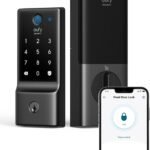
The eufy Security Smart Lock C220 is a compelling option for people who want fast fingerprint entry, a built-in keypad, app controls, and direct Wi-Fi connectivity in one reasonably priced package.
Eufy promotes its smart-lock range as offering home-security features without subscription fees. The C220 includes built-in Wi-Fi, fingerprint identification, automatic locking, weather resistance, and compatibility with Alexa and Google Assistant.
Fingerprint access is particularly convenient when your hands are full. Instead of finding a key or opening an app, a registered user can place a finger on the reader. Other household members can use the touchscreen keypad, the eufy Security app, voice control, or the physical backup key.
The C220 is also suitable for households that need several entry options. Children may prefer a PIN, adults may use fingerprints, and temporary visitors can receive a dedicated access code.
 Key Features
- Fingerprint recognition
- Built-in Wi-Fi
- Touchscreen keypad
- Smartphone-app control
- Automatic locking
- Alexa and Google Assistant support
- Physical key backup
- Weather-resistant exterior
- No mandatory subscription
Pros
- Several unlocking methods
- No separate Wi-Fi bridge needed
- Fast and convenient fingerprint access
- Useful for families and frequent visitors
- App-based remote management
- Strong value compared with many premium biometric locks
Cons
- Does not offer Apple Home Key
- Larger exterior design than some minimalist locks
- Fingerprint performance may vary when fingers are wet, dirty, or poorly positioned
Best For
The eufy C220 is best for households that prioritize fingerprint access but still want a keypad, app control, built-in Wi-Fi, and a backup key.
3. Aqara Smart Lock U100
Best No-Subscription Smart Lock for Apple Home Users
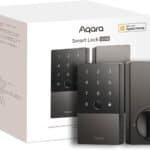
The Aqara Smart Lock U100 combines fingerprint recognition, a keypad, Apple Home Key support, NFC access, app management, and a mechanical key cylinder.
Apple Home Key allows compatible users to unlock the U100 by tapping an iPhone or Apple Watch against the lock. Aqara states that this can continue to work with supported Apple devices even when the device has entered power-reserve mode.
The lock also provides Bluetooth and Zigbee connectivity. Basic local access does not require a subscription, but some remote features, third-party integrations, and automations require a compatible Aqara hub. Matter integration also requires a supported Aqara hub.
That distinction is important: there is no required monthly payment, but you may need to purchase additional hardware if you want remote control or broader automation capabilities.
The keypad is rated IP65 on the exterior side, and Aqara lists support for common American deadbolt dimensions. The lock uses four AA batteries and also includes an external USB-C emergency power option.
 Key Features
- Apple Home Key support
- Fingerprint reader
- Numeric keypad
- NFC access
- Bluetooth and Zigbee connectivity
- Temporary passwords
- Mechanical key backup
- Emergency USB-C power
- No monthly subscription
Pros
- Excellent selection of entry methods
- Strong Apple Home integration
- Fingerprint and Home Key access in one device
- Suitable for households using Aqara sensors and automations
- Emergency power and physical-key fallbacks
Cons
- An Aqara hub is required for certain remote features and automations
- Setup may feel more complicated than a basic Wi-Fi lock
- Best features favor people already using Apple Home or Aqara products
Best For
Choose the Aqara U100 if your home uses Apple devices and you want both fingerprint recognition and Apple Home Key without a monthly subscription.
4. ULTRALOQ U-Bolt Pro Wi-Fi Smart Lock
Best for Multiple Unlocking Methods
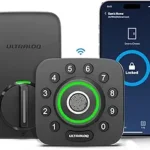
The ULTRALOQ U-Bolt Pro Wi-Fi is designed for users who want several ways to unlock their door. Depending on the exact version purchased, entry methods may include a fingerprint, PIN code, smartphone app, automatic unlocking, voice command, and physical key.
This flexibility can be helpful in a multi-person household. One user can rely on fingerprint recognition, another can enter a code, and a guest can receive temporary app or keypad access.
The U-Bolt Pro line is frequently selected by buyers who want biometric access without moving into the highest price category. Current no-fee smart-lock comparisons continue to list ULTRALOQ among prominent fingerprint-focused options.
However, shoppers should carefully check the Amazon listing before ordering. ULTRALOQ has sold multiple U-Bolt Pro configurations, including Bluetooth models, models packaged with a separate bridge, and versions with Wi-Fi built in. These versions can offer different remote-access capabilities.
 Key Features
- Fingerprint recognition
- Anti-peep keypad
- Smartphone-app access
- Temporary and scheduled codes
- Automatic locking
- Mechanical key backup
- Remote access on compatible Wi-Fi versions
- Voice control on supported configurations
- No mandatory subscription
Pros
- Wide selection of entry methods
- Helpful access controls for guests and service providers
- Fingerprint reader adds everyday convenience
- Anti-peep code entry can make PIN use more discreet
- Available in several configurations
Cons
- Product versions can be confusing
- Some packages require a separate Wi-Fi bridge
- Smart-home compatibility depends on the model selected
Best For
The U-Bolt Pro is a strong choice for large households, rental hosts, home offices, and users who want maximum flexibility in how people enter the property.
5. Wyze Lock Bolt
Best Budget Smart Lock Without a Subscription
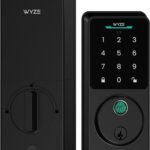
The original Wyze Lock Bolt offers fingerprint access and keypad entry at a price that is often lower than premium Wi-Fi deadbolts. It is a practical option for users who want convenient keyless entry but do not require remote locking from another location.
The original Lock Bolt primarily uses Bluetooth, so you generally need to be near the door to manage it through the app. That limitation also makes it simpler for buyers who do not want another device connected continuously to their home Wi-Fi.
The lock can be opened with a registered fingerprint, PIN, app connection, or backup key. Temporary or scheduled codes can be useful for guests, dog walkers, cleaners, and short-term visitors.
Wyze has also released newer Lock Bolt versions with additional connectivity. A recent review of the Lock Bolt V2 highlights Wi-Fi remote access, fingerprint and PIN storage, app alerts, backup keys, and emergency USB-C power. Check the exact generation in the Amazon listing because the original and V2 have different connectivity features.
 Key Features
- Fingerprint reader
- Backlit keypad
- Bluetooth app management on the original version
- Guest and temporary codes
- Automatic locking
- Backup key
- No required monthly subscription
Pros
- Affordable entry into biometric smart locks
- Fingerprint and keypad access
- Straightforward everyday operation
- Good for users who do not require remote Wi-Fi controls
- Useful for side doors, home offices, or internal access points
Cons
- Original model lacks true remote access
- Fewer smart-home integrations than premium options
- Exact features differ between generations
- Lower weather resistance and security grading on some versions compared with premium deadbolts
Best For
Choose the Wyze Lock Bolt when affordability matters more than extensive remote-control and smart-home capabilities.
How to Choose the Best Smart Lock Without a Monthly Subscription
1. Confirm What “No Subscription” Includes
A lock may operate without a subscription while still offering optional paid services. Before buying, check whether these core functions remain free:
- Remote locking and unlocking
- Access-code creation
- Activity history
- Smart notifications
- Fingerprint management
- Smart-home integration
- Guest access
For a regular smart deadbolt without a camera, most important functions should be available without an ongoing payment.
2. Decide Whether You Need Remote Access
Remote access lets you lock or unlock the door while away from home. It can also help you verify the lock status, provide access to a guest, or receive activity notifications.
There are three common arrangements:
- Built-in Wi-Fi: No separate bridge is required, but battery use may be higher.
- Wi-Fi bridge: The lock connects to a separate plug-in device.
- Smart-home hub: Zigbee, Thread, or another protocol connects through a compatible hub.
A lock can be subscription-free but still require a one-time hardware purchase.
3. Select Your Preferred Entry Methods
Consider how every household member will use the door.
Keypad
A keypad is simple and does not require a smartphone. It is also useful for temporary visitors.
Fingerprint Reader
Fingerprint entry is fast, but performance can be affected by wet, dirty, cold, or damaged fingers.
Apple Home Key
Home Key lets compatible Apple users unlock the door with an iPhone or Apple Watch.
Smartphone App
An app provides access management, activity information, and remote control when supported.
Mechanical Key
A physical key provides a useful backup if the lock loses power or its electronics malfunction.
The best smart lock usually offers at least two electronic methods plus a reliable emergency fallback.
4. Review Door Compatibility
Before ordering, measure:
- Door thickness
- Deadbolt backset
- Bore-hole diameter
- Distance from the lock to decorative trim
- Door alignment
- Clearance around storm or screen doors
Smart locks work best when the existing deadbolt moves smoothly. A poorly aligned door may cause battery drain, failed locking attempts, or excessive motor wear.
5. Consider Security Certification
Look for information about ANSI or BHMA grading when it is provided. Security grading can help you compare resistance to impact, operational wear, and other physical demands.
Remember that smart features cannot compensate for a weak door, loose strike plate, damaged frame, or poorly installed deadbolt.
6. Examine Battery and Emergency Options
Smart locks commonly use AA batteries or rechargeable battery packs. Useful power-related features include:
- Low-battery warnings
- Emergency USB-C or 9-volt power
- Physical key backup
- Battery status in the app
- Easy indoor battery access
Wi-Fi models generally use more power than Bluetooth, Zigbee, or Thread devices.
7. Check Smart-Home Compatibility
Choose a lock that works with the ecosystem you already use:
- Apple Home
- Amazon Alexa
- Google Home
- Samsung SmartThings
- Matter
- Aqara Home
Compatibility can vary by model, hub, firmware version, and connection method, so verify the exact product version rather than relying only on the brand name.
Benefits of a Smart Lock Without Monthly Fees
Lower Long-Term Cost
After the initial purchase, you can continue using the main lock features without adding another recurring bill.
Easier Guest Access
 Temporary PINs or digital keys can replace spare keys that may be copied, forgotten, or lost.
Better Household Convenience
Family members can enter using a fingerprint, code, smartphone, smartwatch, or key.
Improved Access Management
Individual credentials make it easier to add or remove access without replacing the entire lock.
Automatic Locking
 An auto-lock feature can secure the deadbolt after a selected period, reducing the chance of accidentally leaving the door unlocked.
Frequently Asked Questions
Do smart locks require monthly subscriptions?
No. Many smart locks provide keyless entry, app management, access codes, and remote control without monthly fees. Camera-equipped locks may offer optional cloud-storage plans, but the subscription should not be necessary for basic lock operation.
Can I use a smart lock without Wi-Fi?
Yes. Keypads, fingerprints, mechanical keys, Bluetooth, NFC, and Apple Home Key may continue working without Wi-Fi, depending on the model. Remote access usually requires Wi-Fi, a hub, or a bridge.
What happens when a smart lock’s batteries die?
Many models provide advance low-battery warnings. Depending on the lock, you may also have a physical key, external emergency-power port, or replaceable battery compartment.
Are fingerprint smart locks reliable?
A quality fingerprint lock can be very convenient, but no biometric reader is perfect. Registering more than one scan of frequently used fingers and maintaining a backup PIN or key can improve reliability.
Can renters install a smart lock?
That depends on the lease and lock design. Full deadbolt replacements may require landlord approval. Retrofit locks that preserve the exterior key cylinder can be more suitable for renters.
Can smart locks be hacked?
Any connected device can carry cybersecurity risks. Use a reputable manufacturer, install firmware updates, protect your account with a strong unique password, enable multifactor authentication when available, and secure your home Wi-Fi network.
Final Verdict
The best smart lock without a monthly subscription depends on your preferred access method and smart-home ecosystem.
- Best Overall: Schlage Encode Plus
- Best Fingerprint Lock: eufy Security Smart Lock C220
- Best for Apple Home: Aqara Smart Lock U100
- Best for Multiple Entry Methods: ULTRALOQ U-Bolt Pro Wi-Fi
- Best Budget Pick: Wyze Lock Bolt
For most households, the Schlage Encode Plus provides the strongest overall combination of built-in Wi-Fi, keypad access, remote management, Apple Home Key compatibility, and traditional key backup.
Those who prefer fingerprint entry should consider the eufy C220, while Apple-focused smart homes may benefit most from the Aqara U100. The ULTRALOQ U-Bolt Pro offers impressive access flexibility, and the Wyze Lock Bolt is a practical choice for budget-conscious buyers who can live without advanced remote features.
Whichever model you choose, confirm the lock’s dimensions, connection requirements, included accessories, and exact Amazon version before placing your order.