A bright window behind your desk, overhead office lighting, or even a lamp positioned at the wrong angle can turn a glossy monitor into a frustrating mirror. Instead of concentrating on your work, you find yourself changing your sitting position, increasing screen brightness, or squinting just to see what’s displayed.
An anti-glare monitor screen filter offers a relatively simple solution.
These thin filters sit over the surface of your monitor and are designed to diffuse reflections from surrounding light. A quality filter can make a screen easier to see in challenging lighting conditions while also providing an additional physical barrier against fingerprints, dust, and scratches.
3M, for example, says its anti-glare filters diffuse mirror-like reflections and are designed to be removable and reattachable. The company also offers filters across numerous monitor sizes, including common 24-inch and 27-inch displays.
However, choosing the right filter requires more than simply searching for your monitor’s diagonal size. Dimensions, aspect ratio, attachment method, image clarity, and whether you also want privacy protection all matter.
Below are some of the best anti-glare monitor screen filter options to consider.
Table of Contents
Quick Comparison
| Pick | Best For | Key Advantage |
|---|---|---|
| 3M Anti-Glare Filter | Best Overall | Dedicated glare reduction |
| 3M 27-Inch Anti-Glare Filter | 27-inch monitors | Large-screen option |
| SightPro Monitor Filter | Glare + privacy | Multi-purpose protection |
| 24-Inch Anti-Glare Filter | Value | Many affordable choices |
| 27-Inch Anti-Glare Screen Protector | Larger workstations | Broad selection |
1. 3M Anti-Glare Filter — Best Overall
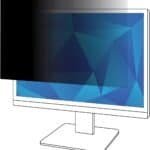
 3M Anti-Glare Filter for 27-Inch Widescreen Monitor
3M is one of the strongest starting points if your primary concern is glare rather than simply screen privacy.
Its anti-glare technology is designed to diffuse mirror-like reflections, helping users see their displays more clearly under changing indoor and outdoor lighting conditions. 3M also describes its filters as thin, lightweight, removable, easy to clean, and capable of adding protection against scratches and dust.
That’s particularly useful in offices with fluorescent lighting or home workspaces positioned close to windows.
Why We Like It
- Specifically designed for glare reduction
- Removable and reattachable
- Helps protect against scratches and dust
- Available for numerous monitor sizes
- Established screen-filter manufacturer
Keep in Mind
Premium filters can cost more than generic alternatives. You’ll also need to select the correct model for your exact monitor dimensions.
Amazon: Shop 3M Anti-Glare Monitor Filters on Amazon
2. 3M 24-Inch Anti-Glare Filter — Best for 24-Inch Office Monitors
 A 24-inch monitor remains a popular size for home and business workstations, and 3M offers multiple monitor filters around this display class. Importantly, 3M’s product catalog distinguishes filters by more than diagonal measurement.
This matters because two monitors marketed as “24 inch” can have different physical dimensions or aspect ratios.
Best For
- Office employees
- Programmers
- Writers
- Students
- Remote workers
- Bright home offices
Pros
- Suitable for common desktop-monitor sizes
- Helps diffuse reflections
- Additional screen protection
- Removable design
Cons
- Correct dimensions must be checked carefully
- Costs more than many generic films
Amazon: Shop 24-Inch 3M Anti-Glare Filters
3. SightPro Monitor Screen Filter — Best for Anti-Glare + Privacy
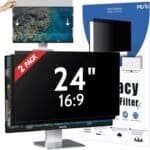 If you work with sensitive information, reducing glare may not be your only concern.
SightPro produces monitor filters combining privacy protection, anti-glare properties, blue-light reduction, and physical screen protection. Its filters can use adhesive strips or slide-mount tabs depending on the monitor and installation method.
This makes SightPro particularly interesting for shared offices.
Think about:
- Accounting departments
- Healthcare offices
- Reception desks
- HR departments
- Financial professionals
- Shared coworking environments
where people sitting nearby might otherwise be able to see the display.
Pros
- Anti-glare functionality
- Added privacy
- Screen scratch protection
- Multiple attachment methods
- Wide compatibility
Cons
A privacy filter isn’t necessarily the best choice for photographers, video editors, or designers who need maximum brightness and viewing angles.
Amazon: Shop SightPro Monitor Filters on Amazon
4. 24-Inch Anti-Glare Screen Protector — Best Budget Choice
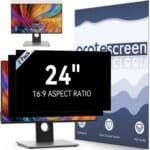 If you don’t need a premium branded filter, Amazon offers numerous anti-glare protectors designed around common 24-inch monitors.
These can be attractive for users outfitting several workstations or simply experimenting with anti-glare protection for the first time.
What to Look For
Don’t choose based only on price.
Check:
- Exact width
- Exact height
- Aspect ratio
- Attachment system
- Matte finish
- Customer feedback
- Return policy
Pros
- Numerous options
- Usually affordable
- Useful for standard office displays
- Some combine additional filtering features
Cons
Quality can vary substantially between brands, and some matte surfaces may reduce perceived sharpness or contrast.
Amazon: Shop 24-Inch Anti-Glare Monitor Filters
5. 27-Inch Anti-Glare Monitor Screen Protector — Best for Large Workstations
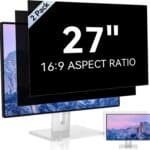 programmers, designers, content creators, analysts, and multi-window users.
The larger glossy surface can also catch substantial reflections.
A correctly sized anti-glare filter can therefore be especially useful when the monitor faces a window or strong artificial lighting.
Pros
- Designed for larger displays
- Numerous models available
- Useful for home-office setups
- Can add physical screen protection
Cons
Large filters need particularly careful installation. Poorly fitted products may shift or leave parts of the display uncovered.
Amazon: Shop 27-Inch Anti-Glare Monitor Filters
Do Anti-Glare Monitor Filters Actually Work?
Yes—but it’s important to understand what they’re designed to accomplish.
An anti-glare filter doesn’t remove the light source causing glare. Instead, its surface helps diffuse reflections so they’re less mirror-like and distracting. That’s how 3M describes the function of its anti-glare technology.
Imagine a bright window reflecting directly from a glossy display.
Without an anti-glare surface, the reflection can appear relatively sharp.
With an appropriate matte filter, that reflection becomes more diffuse and potentially less distracting.
However, there can be trade-offs.
Any material placed between your eyes and the display can potentially affect perceived brightness, contrast, color, or sharpness to some degree. That’s particularly important for professional visual work.
Anti-Glare Filter vs. Privacy Filter
These products are sometimes confused, but they serve different primary purposes.
Anti-glare filters primarily reduce distracting reflections.
Privacy filters primarily restrict side-angle viewing so someone beside you has more difficulty reading your display.
Some products combine both.
For example, SightPro lists privacy protection and anti-glare functionality among the features of its monitor filters.
Choose Anti-Glare If:
You mainly struggle with reflections from:
- Windows
- Lamps
- Ceiling lights
- Bright office environments
Choose Privacy + Anti-Glare If:
You frequently work in:
- Shared offices
- Coworking spaces
- Public environments
- Customer-facing desks
- Areas containing sensitive information
How to Choose the Best Anti-Glare Monitor Screen Filter
Measure Your Monitor Carefully
This is the most important step.
Don’t simply buy a “27-inch filter” because you own a 27-inch monitor.
Measure the actual visible screen width and height.
Also check the aspect ratio, which may be:
- 16:9
- 16:10
- 21:9
- Other ultrawide formats
3M’s monitor catalog demonstrates why this matters: filters are offered across different diagonal sizes and device configurations.
Consider the Attachment Method
Filters generally use mechanisms such as:
Adhesive strips: Hold the filter directly against the display.
Slide tabs: Allow you to insert and remove the filter.
Hanging designs: Rest over the top of compatible monitors.
Magnetic attachment: Common on certain compatible screen designs.
A removable filter is particularly useful if you only need glare reduction during certain parts of the day.
Consider Image Quality
A matte finish can reduce reflections, but stronger diffusion can sometimes make text or images appear less crisp.
For general office tasks, this may be an acceptable trade-off.
For professional photography, color grading, or graphic design, preserving display characteristics may be more important.
Check Touchscreen Compatibility
If your desktop monitor has touch functionality, make sure the filter specifically supports it.
3M states that its anti-glare screen protection is compatible with many devices, including touchscreen displays, but compatibility still depends on choosing the appropriate product.
Who Should Consider an Anti-Glare Monitor Filter?
These accessories can be particularly useful for people who spend significant time in front of desktop displays, including:
- Remote workers
- Programmers
- Writers
- Accountants
- Students
- Office employees
- Customer-service representatives
- Researchers
- Gamers
- Content creators
They’re especially useful when changing the room’s lighting or monitor placement isn’t practical.
Other Ways to Reduce Monitor Glare
A screen filter shouldn’t be your only strategy.
Try positioning your monitor perpendicular to windows rather than directly facing or backing onto them.
You can also:
- Close blinds during strong sunlight
- Move bright lamps
- Use indirect room lighting
- Adjust monitor tilt
- Clean fingerprints from the display
- Adjust screen brightness appropriately
- Use a monitor arm for easier repositioning
A monitor arm can be particularly helpful because you can adjust the display throughout the day as lighting conditions change.
Amazon: Shop Adjustable Monitor Arms
Frequently Asked Questions
What is the best anti-glare monitor screen filter?
A dedicated 3M Anti-Glare Filter is one of the strongest options to consider because 3M offers filters specifically engineered to diffuse mirror-like reflections and provides a broad range of monitor sizes.
Do anti-glare filters make screens blurry?
They can slightly change perceived sharpness because a matte surface diffuses light. The amount varies by filter quality and display.
Can I remove an anti-glare filter?
It depends on the mounting system. Some are designed to be removable. 3M, for example, describes its anti-glare products as removable and reattachable.
Are anti-glare and blue-light filters the same?
No. Glare reduction addresses reflected light, while blue-light filtering concerns portions of light emitted by the display. Some products combine both functions.
Can I use an anti-glare filter on a touchscreen monitor?
Some products support touchscreen displays, but always verify compatibility with the specific filter and monitor before purchasing.
Final Verdict
The best anti-glare monitor screen filter depends primarily on your monitor dimensions, lighting environment, and whether you also need privacy.
For a dedicated glare-reduction solution, 3M Anti-Glare Filters are a strong overall choice. The company offers numerous monitor-filter configurations and specifically designs its anti-glare products to diffuse mirror-like reflections.
If you need privacy and glare reduction together, a SightPro filter is worth considering because its listed features combine privacy protection, anti-glare treatment, and screen protection.
For budget-conscious shoppers, generic 24-inch or 27-inch anti-glare filters provide plenty of options, but measuring the monitor carefully and checking the attachment method should come before price.
A good anti-glare filter won’t transform a poorly arranged workspace by itself. Combine it with thoughtful monitor positioning, controlled room lighting, appropriate screen brightness, and regular breaks for a more comfortable computer setup.