Modern laptops are thinner, lighter, and more powerful than ever, but there’s one compromise that many users still face—limited ports. Whether you’re using a MacBook, Windows ultrabook, Chromebook, or a USB-C-enabled tablet, juggling external monitors, storage devices, keyboards, mice, SD cards, and Ethernet adapters can quickly become frustrating.
That’s where a USB-C docking station comes in.
A quality docking station transforms a single USB-C or Thunderbolt port into a complete workstation. With one cable, you can connect multiple monitors, charge your laptop, transfer files at high speeds, access wired internet, and plug in all your essential peripherals.
Whether you’re working from home, editing videos, programming, gaming, or managing spreadsheets, the best USB-C docking stations simplify your setup while improving productivity and reducing desk clutter.
In this guide, we’ve researched and compared the Top 5 Best USB-C Docking Stations based on connectivity, charging capabilities, build quality, compatibility, and overall value to help you choose the right dock for your workspace.
Table of Contents
Quick Comparison Table
| Product | Best For | Video Output | Power Delivery | Ethernet |
|---|---|---|---|---|
| Anker 575 USB-C Docking Station | Best Overall | Dual 4K HDMI | 85W | Gigabit |
| CalDigit TS4 | Best Premium | Dual 6K / 8K Support | 98W | 2.5GbE |
| Plugable USB-C Triple Display Dock | Multi-Monitor Productivity | Triple Displays | 100W | Gigabit |
| UGREEN Revodok Pro 209 | Best Value | Dual 4K HDMI | 100W | Gigabit |
| Kensington SD5780T Thunderbolt 4 Dock | Business Professionals | Dual 4K / Single 8K | 96W | 2.5GbE |
Why Buy a USB-C Docking Station?
Today’s laptops often include only two or three USB-C ports, making it difficult to connect all your devices simultaneously.
A USB-C docking station solves this problem by expanding your connectivity while keeping your workspace clean and organized.
Benefits include:
- Connect multiple monitors
- Charge your laptop through one cable
- Add USB-A and USB-C ports
- Access wired Gigabit or 2.5Gb Ethernet
- Connect SD and microSD cards
- Reduce cable clutter
- Improve workstation organization
- Instantly connect your entire desk setup
For professionals who work from home or frequently switch between locations, a docking station saves time and creates a seamless desktop experience.
Top 5 Best USB-C Docking Stations
1. Anker 575 USB-C Docking Station
 Best Overall USB-C Docking Station
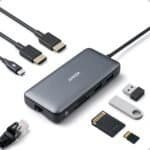
The Anker 575 USB-C Docking Station strikes the perfect balance between performance, reliability, and affordability. Designed for professionals, creators, and remote workers, it offers a comprehensive range of ports in a sleek aluminum chassis.
With support for dual 4K displays, 85W laptop charging, multiple USB ports, SD card readers, and Gigabit Ethernet, it can replace several adapters with a single device.
Key Features
- Dual 4K HDMI outputs
- 85W USB-C Power Delivery
- 13-in-1 connectivity
- Gigabit Ethernet
- SD and microSD card readers
- USB-A and USB-C high-speed ports
Pros
✔ Excellent port selection
✔ Reliable performance
✔ Solid aluminum construction
✔ Fast laptop charging
✔ Great value for professionals
Cons
✘ No DisplayPort outputs
Best For
Remote workers, students, and professionals who need an all-in-one docking solution.
2. CalDigit TS4
 Best Premium Docking Station
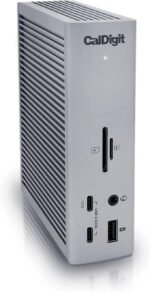
If you’re looking for the ultimate desktop hub, the CalDigit TS4 is one of the most capable docking stations available.
Featuring Thunderbolt 4 technology, it delivers exceptional bandwidth, supports multiple high-resolution displays, and includes an impressive collection of ports for creative professionals.
With 18 ports, 98W laptop charging, and 2.5 Gigabit Ethernet, it’s built for demanding workflows involving video editing, software development, and content creation.
Key Features
- Thunderbolt 4 connectivity
- 18 ports
- Dual 6K monitor support
- 98W Power Delivery
- 2.5 Gigabit Ethernet
- UHS-II SD card reader
Pros
✔ Outstanding performance
✔ Huge number of ports
✔ Premium build quality
✔ Ideal for creators
✔ Fast networking
Cons
✘ Expensive
Best For
Professional editors, designers, programmers, and power users.
3. Plugable USB-C Triple Display Dock
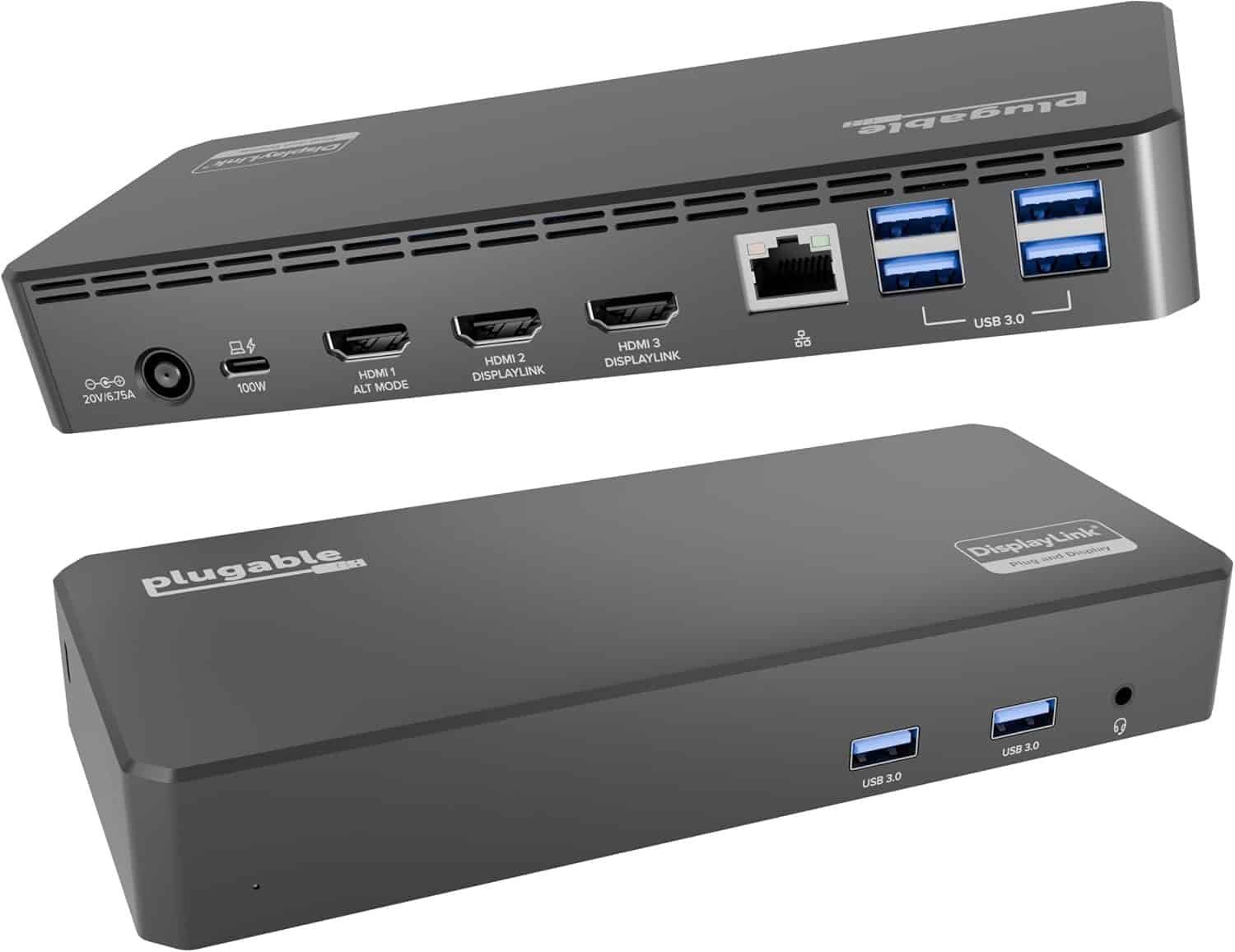 Best for Multi-Monitor Productivity
For users who rely on multiple displays, the Plugable USB-C Triple Display Dock is an excellent choice.
Using DisplayLink technology, it supports up to three external monitors, making it ideal for financial professionals, programmers, engineers, and anyone who multitasks across multiple applications.
It also includes 100W Power Delivery and a generous selection of USB ports.
Key Features
- Triple monitor support
- DisplayLink compatibility
- 100W charging
- HDMI and DisplayPort outputs
- Gigabit Ethernet
- Audio in/out
Pros
✔ Supports three monitors
✔ Excellent for multitasking
✔ Fast charging
✔ Stable performance
✔ Wide operating system compatibility
Cons
✘ DisplayLink software installation required
Best For
Professionals using multiple screens throughout the day.
link on price Amazon
4. UGREEN Revodok Pro 209
 Best Value USB-C Dock
The UGREEN Revodok Pro 209 proves you don’t need to spend a fortune for premium connectivity.
Despite its competitive price, it includes dual HDMI outputs, USB-C Power Delivery up to 100W, high-speed USB ports, SD card readers, and Gigabit Ethernet.
Its compact size also makes it an excellent travel companion.
Key Features
- 9-in-1 docking station
- Dual HDMI outputs
- 100W USB-C charging
- Gigabit Ethernet
- SD and microSD support
- Compact aluminum design
Pros
✔ Excellent value
✔ Lightweight
✔ Easy plug-and-play setup
✔ Fast charging
✔ Portable
Cons
✘ Fewer USB ports than premium docks
Best For
Students, remote workers, and travelers seeking a versatile docking station.
link on price Amazon
5. Kensington SD5780T Thunderbolt 4 Dock
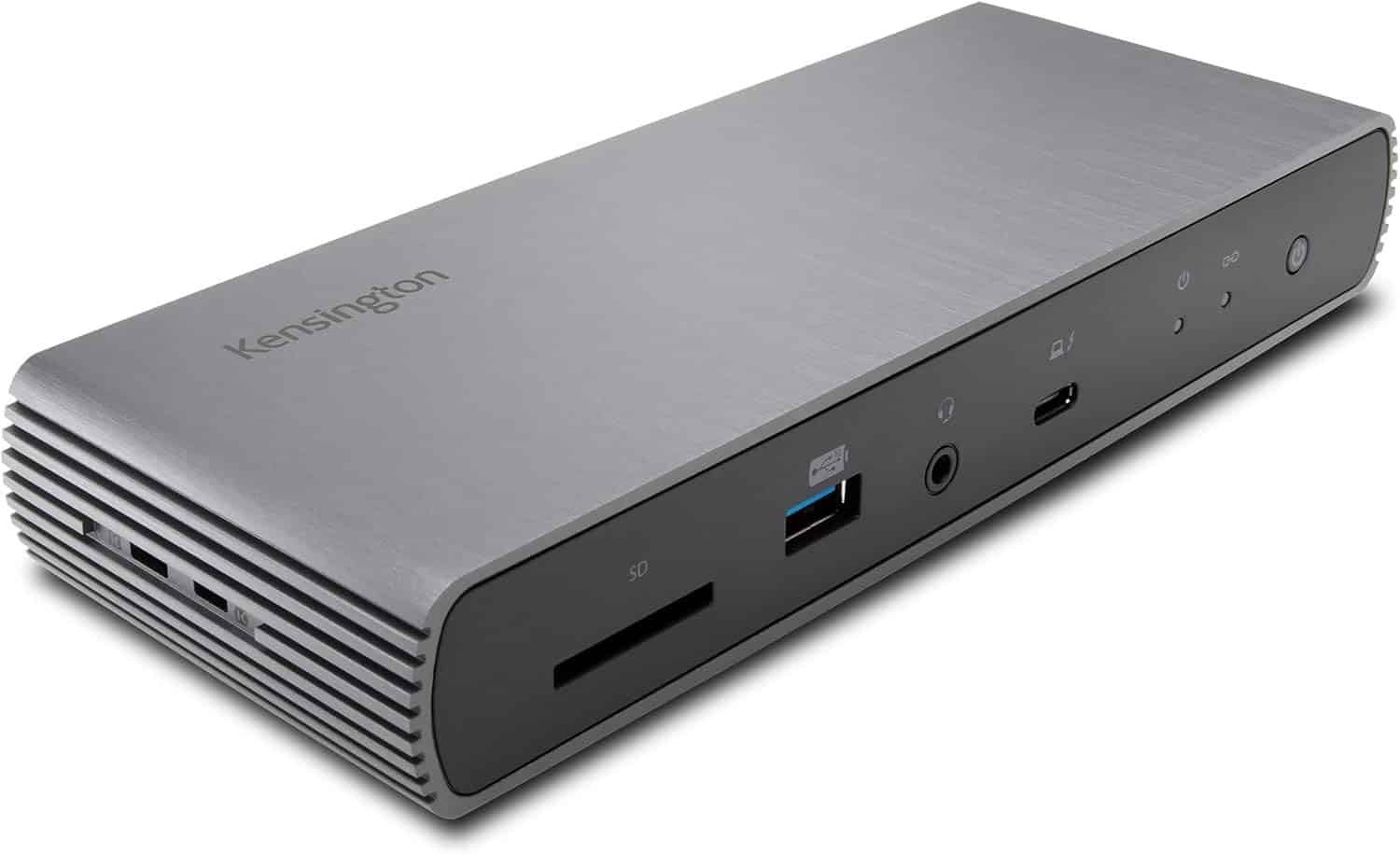 Best for Business Professionals
The Kensington SD5780T Thunderbolt 4 Dock is designed with enterprise users in mind, offering robust performance, enterprise-grade reliability, and broad compatibility with Windows and macOS systems.
Its Thunderbolt 4 connectivity supports dual 4K displays or a single 8K monitor, while 96W Power Delivery keeps your laptop charged throughout the workday.
Key Features
- Thunderbolt 4 interface
- Dual 4K monitor support
- 96W charging
- 2.5 Gigabit Ethernet
- Multiple USB-C and USB-A ports
- Kensington security lock slot
Pros
✔ Enterprise-grade quality
✔ Fast networking
✔ Reliable Thunderbolt performance
✔ Premium construction
✔ Strong security features
Cons
✘ Higher price than standard USB-C docks
Best For
Business users and IT professionals who need dependable connectivity and security.
Buying Guide: How to Choose the Best USB-C Docking Station
Not every docking station offers the same features. Before buying, consider the following factors.
1. Compatibility
Check whether your laptop supports:
- USB-C with DisplayPort Alt Mode
- Thunderbolt 3
- Thunderbolt 4
- USB4
Some docks require Thunderbolt for full functionality.
2. Monitor Support
Choose a dock based on your display requirements.
- Single 4K monitor
- Dual 4K monitors
- Triple displays
- 6K or 8K support
Always verify your laptop’s graphics capabilities as well.
3. Power Delivery
Power Delivery allows your dock to charge your laptop through the same cable used for data and video.
Recommended charging:
- 65W for ultrabooks
- 85–100W for larger laptops
- 100W+ for workstation-class devices
4. Port Selection
A good docking station should include:
- USB-C
- USB-A
- HDMI
- DisplayPort
- Ethernet
- SD card reader
- Audio jack
Choose a model with enough ports for your current and future devices.
5. Ethernet Speed
While Gigabit Ethernet is sufficient for most users, professionals working with large files or high-speed internet may benefit from 2.5GbE networking.
Benefits of Using a USB-C Docking Station
Cleaner Workspace
One cable replaces multiple adapters, reducing desk clutter.
Improved Productivity
Connect all your devices instantly without plugging and unplugging cables.
Faster Charging
Many docks provide enough power to charge your laptop while simultaneously powering connected peripherals.
Easier Multi-Monitor Setup
Expand your desktop to increase multitasking efficiency.
Better Connectivity
Access wired networking, storage devices, cameras, and external accessories through a single hub.
Tips for Getting the Best Performance
To maximize your docking station’s performance:
- Use the included USB-C or Thunderbolt cable.
- Keep firmware updated when available.
- Verify your laptop supports video over USB-C.
- Connect high-bandwidth devices to the fastest available ports.
- Use certified HDMI or DisplayPort cables for high-resolution displays.
- Position the dock in a well-ventilated area to prevent overheating.
Frequently Asked Questions
What’s the difference between a USB-C dock and a Thunderbolt dock?
Thunderbolt docks offer significantly higher bandwidth, support more displays, and handle faster data transfers. Standard USB-C docks are often more affordable and sufficient for everyday office tasks.
Can I charge my laptop through a USB-C docking station?
Yes. Most modern docking stations support USB-C Power Delivery, allowing you to charge compatible laptops using the same cable that connects your peripherals.
Do USB-C docking stations work with MacBooks?
Yes, but monitor support varies by MacBook model. Some Apple Silicon models have native limitations on the number of external displays they support unless using DisplayLink-enabled docks.
Can I connect two monitors?
Many USB-C and Thunderbolt docks support dual monitors, while some premium models can drive three or more displays.
Are docking stations worth buying?
Absolutely. If you regularly connect external monitors, keyboards, storage devices, or wired internet, a docking station greatly improves convenience, productivity, and cable management.
Final Verdict
The best USB-C docking stations make it easy to transform a laptop into a fully functional desktop workstation with a single cable.
Our top recommendations are:
- Best Overall: Anker 575 USB-C Docking Station
- Best Premium: CalDigit TS4
- Best for Multi-Monitor Setups: Plugable USB-C Triple Display Dock
- Best Value: UGREEN Revodok Pro 209
- Best for Business: Kensington SD5780T Thunderbolt 4 Dock
Whether you’re working remotely, editing content, gaming, or managing multiple displays, these docking stations provide the connectivity and convenience needed for a more productive workspace.
Conclusion
A USB-C docking station is one of the most valuable upgrades you can make to your desk setup. It eliminates cable clutter, expands your laptop’s connectivity, and enables a seamless multi-device workflow. From budget-friendly hubs to premium Thunderbolt docks, the models featured in this guide cater to a variety of needs and budgets.
Choose the docking station that matches your laptop, monitor requirements, and daily workflow, and enjoy a cleaner, faster, and more efficient workspace.